Looting bag
| Looting bag | |||||||||||||||||||
|---|---|---|---|---|---|---|---|---|---|---|---|---|---|---|---|---|---|---|---|
 | |||||||||||||||||||
| Properties | |||||||||||||||||||
| Tradeable | No | ||||||||||||||||||
| Equipable | No | ||||||||||||||||||
| Stackable | No | ||||||||||||||||||
| Noteable | No | ||||||||||||||||||
| Options | Open, Check, Deposit, Settings, Destroy | ||||||||||||||||||
| Values | |||||||||||||||||||
| Value | 1,000 Pk Points | ||||||||||||||||||
| Weight | 0.01 kg | ||||||||||||||||||
| Advanced data | |||||||||||||||||||
| Item ID | 11941 | ||||||||||||||||||

The Looting bag is extra storage for Wilderness loot. It has 28 slots on top of your inventory, but you can only fill it while you are in the Wilderness or another PvP zone where you lose items on death, and only with tradeable items that have a value. Everything in it is lost if you die there, so it lets you carry more loot without protecting it. It costs 250 Bounty Hunter points in the Bounty Hunter shop, it cannot be traded, and each player can own only one.
Using the bag
- Space: 28 slots, the same as your inventory. A stack of a stackable item uses one slot; other items use one slot each.
- Adding items: use an item on the bag, or choose Deposit and click items in the window that opens to store 1, 5, all or a chosen amount.
- Settings: choose whether using an item on the bag asks how many to store or always stores as many as possible. It asks by default.
- Open bag: Open turns it into the open bag
 , and its first option becomes Close. While you carry the open bag, items you pick up go straight into it whenever the bag can take them, and so does loot that your Collector's ring picks up for you.
 - Check: shows what is in the bag and the total value of its contents in PKP.
- Banking: at a bank, click the bag in your inventory to open the Bank your loot window, where you can bank the items one at a time or all at once.
The looting bag window
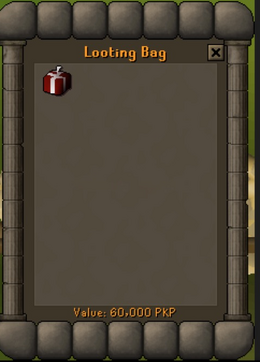
- Check (Looting Bag): the items in the bag and their total Value in PKP, or The bag is empty.
- Deposit (Add to bag): your inventory, with the Bag value at the bottom. Click an item to store it: Store-1, Store-5, Store-All or Store-X.
- At a bank (Bank your loot): click the bag in your inventory while your bank is open. Click an item to bank it (Deposit-1, Deposit-5, Deposit-All or Deposit-X), or use the Deposit loot button at the top to bank everything.
What can go in
- Items can only be added while you are in the Wilderness or another PvP zone where you lose items on death. Anywhere else you get the message You can't put items in the looting bag unless you're in the Wilderness.
- Only tradeable items that have a PKP value.
- Not the Wilderness Chest or Gold Wilderness Chest from the Wilderness Chest event, loot keys, or another looting bag.
- Nothing can be added during a minigame or while you are in a raid party.
Death
The looting bag can never be protected. If you die somewhere you lose items, the bag is deleted and everything inside it goes to the player who killed you (if no player killed you, it drops on the floor for you). This happens even if you are not skulled or have Protect Item on. You cannot destroy the bag while you are in a PvP zone. Elsewhere, Destroy deletes the bag together with its contents, after a warning that shows what the contents are worth. See Items Kept on Death for the general rules.
How to get it
The Bounty Hunter shop sells the Looting bag for 250 Bounty Hunter points. It cannot be sold back, and the shop will not sell you a second bag while you own one: You can't have more than one of those. It cannot be traded, so the shop is the only way to get it.