Clans

Clans on Roat Pkz are built around clan chats. Every player owns a clan chat that carries their name, and a clan is the group of players who use it. Being in a clan lets you talk in its chat, raid together, share a vault, perks and a clan island, and fight for your clan in the Clan Warfare events and the Clan Cup.
The Clan Chat page has more pictures of the clan interfaces.
Joining a clan
- Open the Clan Chat tab, click Join Chat and type the name of the clan's owner. If you leave the name empty, you join the help clan chat, where you can ask questions about the game.
- When you join, the game says Now talking in followed by the clan's name and its owner.
- Click Leave Clan (the same button) to leave.
- You join the last clan chat you were in again every time you log in.
- To talk in the clan chat, start your message with a slash:
/hello.
You cannot join a clan chat when:
- your rank in it is lower than its Who can enter chat? setting;
- you have been kicked from it recently, or banned from it;
- it is full and nobody can be removed to make room. A clan chat holds 60 players. When a player joins a full clan chat, the game makes room by removing a member whose rank is not higher than the new player's: the member with the lowest rank and, among those, the one who has been AFK the longest. Members ranked Captain or higher, and members who are in a PvP area or a minigame, are never removed this way.
Hardcore PvP players can only join the help and events clan chats.
The clan chat tab
The tab shows the clan's name, its owner and how many players are in it (for example Clan Chat (25/60)), and the list of members with their rank icons. Next to a member you can see where they are if they share their location, or AFK when they have been idle for 15 minutes. You can sort the list by rank, name, location or join time. The tab also has these buttons; the teleport, kit, YouTube, Discord and island buttons only appear when the clan has set them up:
| Button | What it does | |
|---|---|---|
 |
Teleport | Teleports you to the clan's own teleport spot, the same as ::cz. The owner and co-owners set the spot by standing on it and choosing Set Clan Zone Location.
|
 |
Kit | Loads the clan's custom kit: the inventory, equipment, levels and spellbook the owner or a co-owner saved for the clan. |
 |
YouTube | Opens the clan's YouTube link. |
 |
Discord | Opens the clan's Discord invite. |
 |
Clan Info | Shows the clan's total messages, how many members are in it and how many of them are AFK, how many ranked members it has, its record number of players and the date it was created. |
 |
Clan Cup | Opens the Clan Cup interface with your clan's progress. |
 |
Clan Vault | Opens the clan vault and the clan perks. |
 |
Clan Island | Teleports you to the clan island or opens the clan islands interface. |
Your own clan settings
In the clan setup you can also turn three settings on or off for yourself. They apply in every clan chat you join:
- Share Location: other members can see where you are in the member list.
- Allow Teleports: other members can right-click your name and ask to teleport to you. You accept or decline the request, and you have to be in a safe area to accept it.
- Allow Copy Kit: other members can right-click your name and ask to copy your current equipment, inventory, levels and spellbook as a custom kit. You accept or decline the request.
Setting up your clan
 Click Clan Setup in the clan chat tab to manage your own clan chat. A co-owner who is in a clan chat opens that clan's setup instead. In the setup you can:
- Set the clan's name: up to 50 characters. This is the name shown in front of every clan chat message; the clan itself is always joined with the owner's name.
- Give ranks: the setup lists your friends; right-click a player there and pick a rank. Only the owner can make co-owners.
- Choose who can enter, talk and kick: Who can enter chat? and Who can talk in chat? go from Anyone through Any Friends and each rank up to Only Me. Who can kick & ban? goes from Recruit+ up to Only Me. A new clan lets anyone enter and talk, and lets co-owners kick.
- Choose the clan broadcasts: PvP kill and death messages (with a minimum PK point value), PvM loot messages (from 1,000 PK points by default), skill level-ups (from level 50 by default), collection log messages and Slayer task completions can all be shown in the clan chat.
- Kick AFK members: switch it on to remove members who have been AFK for a set time, from 5 minutes up to 48 hours (30 minutes by default).
- Read the logs and the ban list: the clan log lists the changes made to the clan (ranks, settings, kicks, bans and purchases), and the ban list shows every banned player. Click a ban to lift it.
The owner and co-owners can also set the clan's teleport spot, custom kit, YouTube and Discord links from the buttons in the clan chat tab.
Ranks
Players on the owner's friends list are Friends automatically. Every other rank is given in the clan setup.
| Rank | Notes | |
|---|---|---|
 |
Owner | The player the clan chat belongs to. Can change everything. |
 |
Co-Owner | Can change the clan's settings, give every rank except co-owner, spend the vault, and manage the clan's island and recruitment. |
 |
General | Never removed to make room when the clan chat is full. |
 |
Captain | |
 |
Lieutenant | Ranks for the clan's own use, for example in the Who can settings. |
 |
Sergeant | |
 |
Corporal | |
 |
Recruit | |
 |
Friend | Any player on the owner's friends list. |
| – | Unranked | Everyone else. |
Every rank from Recruit up:
- cannot be kicked or banned from the clan chat;
- can use the kick and ban options, if the clan's Who can kick & ban? setting allows their rank;
- can start a Chambers of Xeric raid for the clan.
The Who can enter chat? and Who can talk in chat? settings can be set to a rank, so that only that rank and higher can join or talk.
Kicking and banning
Ranked members can right-click a member in the clan chat tab to see these options. You need a rank of at least the clan's Who can kick & ban? setting.
- Remove takes the player out of the clan chat. They can join again straight away. You can only remove players with a lower rank than yours.
- Kick removes the player and stops them from joining again for a while.
- Ban and Kick removes the player and bans them from the clan chat until the ban is lifted in the clan setup. A clan can have up to 400 bans.
Only unranked players and Friends can be kicked or banned. Every kick, ban and removal is announced in the clan chat and written to the clan log.
Clan vault
The clan vault is a shared pot of PK points for the whole clan. Open it with the vault button in the clan chat tab.
- Anyone in the clan can add PK points, or add valuable tradeable items, which are turned into PK points at their value. You cannot add to the vault in a PvP area or during a minigame.
- Only the owner and co-owners can spend the vault, on perks, islands and recruitment bids.
- The vault lists the members who gave the most in the last 24 hours, 7 days and 28 days, and of all time. Perks that a member buys with their own PK points count too.
Clan perks
Clan perks are bonuses for every member of the clan while they are in its clan chat. Anyone in the clan can buy a perk for the whole clan with their own PK points (not in a PvP area or a minigame), and the owner and co-owners can pay for it from the vault. Perks are bought for 1, 4, 12 or 24 hours, or 3 or 7 days, and the time is added to any time the perk still has left. Longer purchases are cheaper per hour.
The table shows the prices in PK points for 1 hour, 24 hours and 7 days.
| Perk | Effect | 1 hour | 24 hours | 7 days | |
|---|---|---|---|---|---|
| Bulk perks | |||||
 |
Make It Rain | Every perk below at once. Perks that are already active are extended. | 160,000 | 1,600,000 | 5,376,000 |
 |
Skillmaster | All 15 skilling XP perks at once. | 37,500 | 375,000 | 1,260,000 |
| PvP perks | |||||
 |
Refreshed | When you enter the Wilderness (or a Royal or Divine donator PvP area) you get a stamina potion effect and 20% run energy, and an anglerfish boost if you are at full Hitpoints. | 5,000 | 50,000 | 168,000 |
 |
Invigorate | When you enter the Wilderness (or a Royal or Divine donator PvP area) you get the effects of a super combat potion, a bastion potion and a magic potion. | 5,000 | 50,000 | 168,000 |
 |
Emblem Hunter | Each upgrade of your Bounty Hunter emblem has a 50% chance to go up 2 tiers instead of 1. | 5,000 | 50,000 | 168,000 |
 |
The Agile | Use Agility shortcuts without their level or lap requirements. | 25,000 | 250,000 | 840,000 |
 |
Special Restore | The cooldown for restoring your special attack is at most 90 seconds. | 10,000 | 100,000 | 336,000 |
 |
Royalty | Teleport with a royal seed pod without using a charge. | 2,500 | 25,000 | 84,000 |
| PvM perks | |||||
 |
Monster Slayer | Monster drop rates are 10% better (a 1/1,000 drop becomes 1/900). | 50,000 | 500,000 | 1,680,000 |
 |
Slayer Gatherer | 50% more Slayer points for each Slayer task. | 12,500 | 125,000 | 420,000 |
 |
Boss Hunter | Free teleports to TzTok-Jad, Skotizo, the Avatar of Destruction and the Gemstone Crab in the teleport interface. | 5,000 | 50,000 | 168,000 |
| Misc perks | |||||
 |
Vote Master | One extra vote point every time you vote. | 12,500 | 125,000 | 420,000 |
 |
Starburst | 50% more stardust at Shooting Star events. | 37,500 | 375,000 | 1,260,000 |
 |
Holy | Unlocks Rigour and Augury for every member. | 15,000 | 150,000 | 504,000 |
 |
Mandrith Briber | Free entry to the Resource Area. | 3,750 | 37,500 | 126,000 |
 |
Treasure Seeker | Clue scroll drop rates are 20% better. | 2,500 | 25,000 | 84,000 |
 |
Slasher | You always cut through spider webs on the first try. | 2,500 | 25,000 | 84,000 |
 |
Director | Choose which Wilderness level an obelisk takes you to, whatever your elo. | 2,500 | 25,000 | 84,000 |
| Skilling perks | |||||
 |
Skill XP (10%) | 10% more XP in one skill. There is one perk for each of Slayer, Woodcutting, Fletching, Agility, Thieving, Mining, Smithing, Fishing, Cooking, Crafting, Firemaking, Herblore, Farming, Runecrafting and Hunter. | 5,000 | 50,000 | 168,000 |
The 4-hour, 12-hour and 3-day options cost 3, 7 and 21.6 times the 1-hour price.
Clan islands
A clan island is a private island for the members of one clan. There are four tiers. Anyone in the clan can buy island time with their own PK points (not in a PvP area or a minigame), and the owner and co-owners can pay from the vault. Island time is bought per tier for 1, 7 or 28 days, and new time is added to the time left.
- Teleport to your clan's island with
::cior the island button in the clan chat tab. The owner and co-owners can also set a custom command for it, such as::yourclan. - The clan islands interface lets you look around an island before you buy it, and lets the owner and co-owners choose which of the clan's islands is active.
- Players who are not in the clan are sent home if they end up on the island.
| Tier | 1 day | 7 days | 28 days | What it has |
|---|---|---|---|---|
| Tier 1 | 5,000 | 30,000 | 100,000 | A bank chest, a restoration pool, a loot key chest and a scoreboard. |
| Tier 2 | 12,500 | 75,000 | 250,000 | A bank, a restoration pool, a loot key chest, the Trading post, shops (the Pk point shop, the Bounty Hunter shop and the melee shop), the lottery, a scoreboard and an event board. |
| Tier 3 | 25,000 | 150,000 | 500,000 | A small Fun PK area, a bank, a restoration pool, a loot key chest, the Trading post, combat dummies, a prayer altar, the lottery, shops (also the Donator shop and the Voting shop), a scoreboard, an event board and a clan recruitment board. |
| Tier 4 | 50,000 | 300,000 | 1,000,000 | Single and multi Fun PK areas, combat dummies, the Trading post, the shops, the lottery, Krystilia, a private flower poker lane, a private obelisk into the Wilderness, a portal with free teleports to the Corporeal Beast, a Clan Cup area, an event board and a clan recruitment board. |
Prices are in PK points.
-
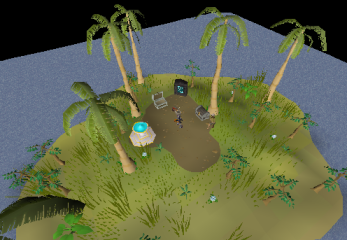 Tier 1 island
 -
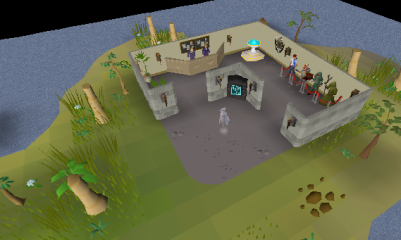 Tier 2 island
 -
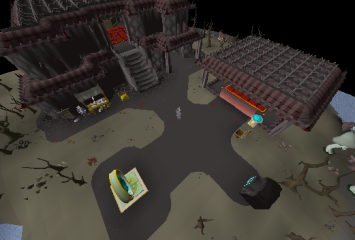 Tier 3 island
 -
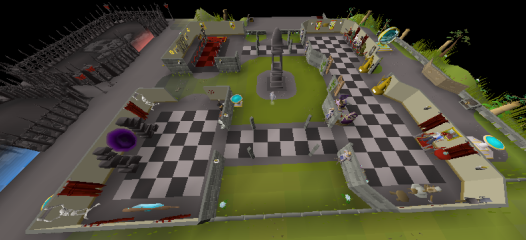 Tier 4 island


Clan recruitment
Clans can advertise themselves on the clan recruitment board at home (::recruit), next to the Clan Recruiter. The board has three tabs: the clans that are recruiting, the auction and your own clan.
- The owner and co-owners write the clan's advert (a name and two lines of text), can link a forum topic, and choose whether the clan is shown on the board. Clans with more active perks and more members are shown higher.
- Every day there is an auction for the Gold, Silver and Bronze recruitment spots at the top of the board. The lowest bid is 1,000 PK points, and every new bid has to beat the current one by at least 1,000. Bids are paid from your own PK points or, by the owner and co-owners, from the vault. If your bid is beaten, the PK points go back to where they came from.
- The auction ends at midnight server time, and the highest bidders hold the spots for the next day. The Clan Recruiter at home calls out the clan that holds the Gold spot.
Playing as a clan
- Raids: you have to be in a clan chat to enter the Chambers of Xeric or the Theatre of Blood; if you are not in one, you join your own. Raid parties are made up of players in the same clan chat, and starting a Chambers of Xeric raid needs the rank Recruit or higher in that clan chat (or your own clan chat).
- Clan Fun PK: the portal inside Fun PK takes your clan to its own copy of the Fun PK area, where only members of your clan chat can join you. The help clan chat cannot use it.
- Clan Warfare: an automatic event in the Wilderness where clans fight for points around a zone (
::warfare). It lasts 15 minutes, or 45 minutes for the Super Warfare on Saturdays. - Clan Cup: Roat Pkz's clan tournament. Clans qualify by earning points in PvP activities and events; the Clan Cup Master at home (
::clancup) and the Clan Cup button in the clan chat tab show your clan's progress. - Daily hiscores: the daily hiscores scoreboard at home (
::daily) also ranks clans in most categories.