Makeover Mage
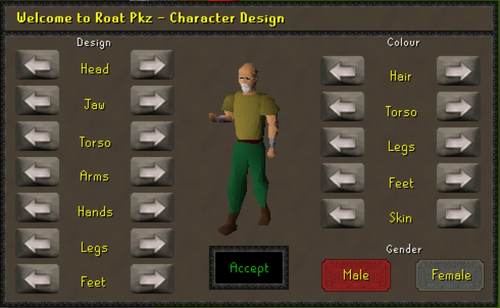
The Makeover Mage changes your character's appearance for free. Talk to him at Edgeville home to open the Character Design window, where you pick your hairstyle, clothes, colours and gender. Most of it is open to everyone, but some skin colours are only for donators and for players who finished a Halloween event.
Overview
Finding the Makeover Mage
The Makeover Mage stands at Edgeville home. Type ::makeover to teleport right next to him.
| Option | What it does |
|---|---|
| Talk-to | Opens the Character Design window. |
| Makeover | Opens the Character Design window. |
| Age | Tells you the date you first logged in to Roat Pkz. First log-ins have only been recorded since early 2015, so older accounts get a note that they may be older still. |
New players also see the Character Design window once, when they finish creating their account.
The Character Design window
Colour (right): use the arrows to change the colour of your Hair, Torso, Legs, Feet and Skin.
Gender: Male or Female. Each has its own set of styles.
Preview: your character in the middle shows every change as you click.
Accept saves your new look. Close the window instead to keep your old one.
| Colour | Choices |
|---|---|
| Hair | 25 |
| Torso | 29 |
| Legs | 29 |
| Feet | 6 |
| Skin | 22 |
Skin colours
The skin colours always come in the same order as you click through them with the arrows. The first eight are for everyone; the rest need a donator rank or a finished Halloween event.
| Skin colours | Who can use them |
|---|---|
| 1st to 8th | Everyone |
| 9th to 11th |  Donator+ Donator+
|
| 12th to 15th |  Super Donator+ Super Donator+
|
| 16th | Players who have finished any Halloween event |
| 17th to 19th |  Extreme Donator+ Extreme Donator+
|
| 20th to 22nd |  Legendary Donator+ Legendary Donator+
|
You can preview every colour. If you pick one you can't use yet and click Accept, your look isn't saved: the chat tells you which rank or event it needs, and the window stays open so you can pick another.
Mini-Me Pet
If you own a Mini-Me Pet, you can restyle it in the same window. Right-click your pet, choose Configure, then Edit Appearance. The window opens with your pet's current look, and Accept changes your pet instead of you. The same skin colour rules apply.
You can only configure your pet in a safe zone, out of combat and outside minigames.
Tips
- Makeovers are free, so try things out. Nothing changes until you click Accept.
- Your account's age is also shown in the Player tab. Hover over it to see your first log-in date.
::makeoveris the quickest way to the mage from anywhere you can teleport.
Commands
| Command | What it does |
|---|---|
::makeover |
Teleports you next to the Makeover Mage at home. ::haircut and ::appearance do the same.
|
See also
| Side tabs | |
|---|---|
| Your account | |
| Getting around | |
| Knowledge Center | |
| Rewards | |
| Activities | |