Player tab
The Player tab is the side tab with a man and a cog wheel, in the bottom row between the Friends List and Logout tabs. Hovering over it shows Account Management. At the top it shows your name, net worth and account age. Below that are 40 buttons spread over three sub-tabs: Account Management, Knowledge Center and Useful Links. Most buttons open a game window, such as your Collection log or your Custom kits; the Useful Links open a Roat Pkz website in your browser.
Overview
Opening the Player tab
Click the tab's icon in the bottom row, or press F9. Both F-key layouts put the Player tab on F9, and you can move it to another key.
Three buttons at the top of the tab switch between the sub-tabs: the cog for Account Management, the two people for Knowledge Center and the chain link for Useful Links.
Account Management
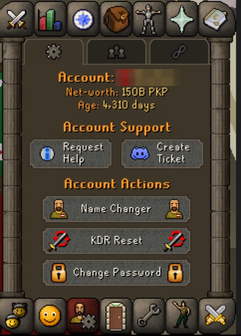
- Account: your rank icon and name. Its tooltip lists lifetime stats: total item switches, tiles walked, teleports, food eaten, potion doses drunk and monster kills.
- Net-worth: your current net worth in PKP. Its tooltip gives the exact amount and your highest net worth ever, with the date you reached it.
- Age: how many days ago you first logged in. Its tooltip gives the exact date. If that date is from the very start of 2015 or earlier, the tooltip adds that log-ins were only recorded from 2015, so your account may be older.
Below the header are two sections: Account Support and Account Actions.
| Button | What it does |
|---|---|
| Account Support | |
 |
Opens the Staff Online window, which lists the staff team with online members first. From there you can send a help request to the staff who are online. It only works while a staff member is online and your Private chat is set to On. |
 |
Asks if you'd like to open a ticket on Discord, then opens Discord in your browser. |
| Account Actions | |
 |
Opens the display name panel, where you can look up a name and change yours. See Name change. |
 |
Explains how to reset your kills and deaths. You need a KDR reset scroll, which is sold in the donation store (::donate) and can be bought on the Trading post. The message also shows the scroll's price estimate.
|
 |
Asks you to type a new password twice, then changes it. ::changepassword does the same.
|
Knowledge Center
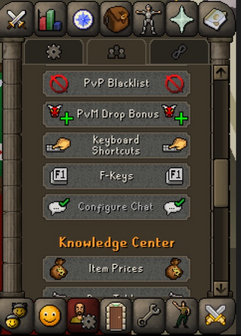
- Your Data: windows about your own account, such as your collection log, kits, tasks, blacklist and settings.
- Knowledge Center: guides and reference windows, such as prices, drop tables, rewards and events.
| Button | What it does |
|---|---|
| Your Data | |
 |
Opens your Collection log. |
 |
Opens Monster Kill Counts: your kills, best time and current streak for each monster. See Kill count. |
 |
Opens the Custom Kits window. See Custom kits. |
 |
Opens the milestones you unlock by spending Game Credits in the store. See Credit Spend. |
 |
Opens the VIP window. See VIP Program. |
 |
Opens the Deal Streak window. See Deal Streak. |
 |
Opens Roat Pkz Net Worth, a breakdown of everything your account holds. See Net worth. |
 |
Opens your daily tasks. See Daily tasks. |
 |
Opens the Achievements window. See Achievements. |
 |
Opens the Vote window, where you claim your votes. See Voting. |
 |
Opens your PvP blacklist. Royal and Divine Donators are asked which list to open: the PvP & Wilderness Blacklist, the Royal Donator Zone Blacklist or the Divine Donator Zone Blacklist. See Blacklist. |
 |
Opens Your PvM Drop Bonus, which shows everything that raises your drop rates. See Drop rate bonus. |
 |
Opens Roat Pkz Keyboard Shortcuts. See Keyboard shortcuts. |
 |
Opens the Keybinding window, where you choose which key opens each side tab. See F-keys. |
 |
Opens Chat Settings, where you choose which messages show in your chat box. See Chat Settings. |
| Knowledge Center | |
 |
Opens Roat Pkz Price Estimates. See Item prices. |
 |
Opens the drop tables for bosses and raids. See Drop tables. |
 |
Opens Best In Slot Items. See Best in slot. |
 |
Opens the YouTube giveaways window. See YouTube Giveaway System. |
 |
Opens Mystery Box Rewards on the Divine Mystery Box. See Mystery boxes. |
 |
Opens Crate & Chest Rewards. See PvP crates. |
 |
Opens the clue scroll casket rewards. See Treasure Trails. |
 |
Opens the Events schedule. See Events. |
 |
Opens the Event Locations map of the Wilderness. See Events. |
 |
Opens the Staff Online window, the same window as Request Help. |
 |
Opens Donator Benefits. See Donator ranks. |
 |
Opens Top Donators. See Hiscores. |
Useful Links
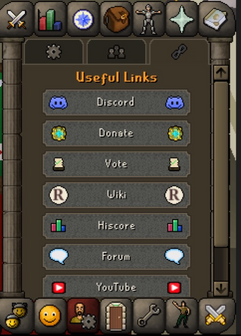
| Button | What it does |
|---|---|
 |
Opens the Roat Pkz Discord server. |
 |
Opens the donation store with your name already filled in. See Donating. |
 |
Opens the voting website. See Voting. |
 |
Opens this wiki. |
 |
Opens the hiscores on the Roat Pkz website. See Hiscores. |
 |
Opens the Roat Pkz forum. |
 |
Opens the Roat Pkz YouTube channel. |
 |
Opens the Roat Pkz Facebook page. |
Tips
- Hover over the Account, Net-worth and Age lines for stats you can't see anywhere else, such as your total tiles walked and your highest net worth.
- Request Help needs a staff member online. If nobody is online, use Create Ticket to reach the team on Discord.
- Royal and Divine Donators can also open their blacklists with
::royal-blacklistand::divine-blacklist. ::networthonly prints your net worth in the chat box. The Networth button and::nwdetailopen the full window.
Commands
These commands open the same windows and websites as the buttons.
| Command | Opens |
|---|---|
::staff, ::help |
Staff Online (Request Help) |
::changepassword |
Change Password |
::collectionlog, ::collection |
Collection log |
::npckills, ::killcount |
Monster Kill Counts |
::kits |
Custom kits |
::donate-bonus, ::credit-spend |
Credit Spend |
::vip |
VIP |
::deal |
Deal Streak |
::nwdetail |
Net worth |
::vote |
The Vote window |
::blacklist |
The blacklist for where you are standing |
::dropbonus |
Your PvM Drop Bonus |
::keybinds |
Keyboard shortcuts |
::fkeys |
Keybinding (F-keys) |
::chatconfig |
Chat Settings |
::prices |
Price Estimates |
::droptable, ::drops |
Drop tables |
::bis |
Best in slot |
::giveaway |
YouTube giveaways |
::mboxes |
Mystery Box Rewards |
::crates |
Crate & Chest Rewards |
::clue-rewards |
Clue scroll casket rewards |
::events |
The Events schedule |
::locs |
Event Locations |
::benefits |
Donator Benefits |
::topdonators |
Top Donators |
::discord, ::donate, ::vote-site, ::wiki, ::hiscore, ::forum |
The matching website |
See also
| Side tabs | |
|---|---|
| Your account | |
| Getting around | |
| Knowledge Center | |
| Rewards | |
| Activities | |