Loot keys

Loot keys collect the loot from your PvP kills. With loot keys turned on, the items your victim drops for you go into a Loot key in your inventory instead of onto the ground, so you don't have to pick them up one by one. Take your keys to a loot chest outside the PvP areas and open the Wilderness Loot Keys window to withdraw your loot, bank it or destroy what you don't want. Loot keys are off until you turn them on with Skully, next to the loot chest at Edgeville home (::lootkey).
Overview
Turning loot keys on
Find Skully next to the loot chest at Edgeville home (::lootkey teleports you there). Right-click him and choose Settings to open the Loot Key & Death Configuration menu. Click a line to change it. Changing the settings is free, and you can switch them back at any time.
| Setting | Default | What it does |
|---|---|---|
| Loot Keys Enabled | False | Turns loot keys on or off. |
| Drop food & potions to floor | True | Food and potions drop to the ground instead of going into the key, so you can use them straight away. |
| Pickup valuable items only (1+ PKP) | True | Only items with a PK point value go into the key. Everything else drops to the ground. |
| Drop items to ground with 5,000+ PKP value | 5,000 PKP | Any item, or stack of items, worth this much or more drops to the ground instead of going into the key, so you can pick up your best loot yourself. Click the line to set a different value. |
The same menu also switches the Trailblazer Vengeance, Trailblazer Death and Echoes Death animations on and off once you've unlocked them.
Getting a loot key
With loot keys on, every time you kill a player in a dangerous area, the items they drop for you go into a new loot key in your inventory. Anything your settings leave out drops to the ground as normal, and so do the bones and the PK points for the kill.
- Up to 5 keys. You can hold 5 loot keys at a time. With 5 keys, you get the message You have reached the limit of 5 loot keys. and the loot from your next kill drops to the ground.
- Your victim's keys. If the player you kill was carrying loot keys, you get their keys with everything still inside, even if your own loot keys are turned off. If you already have 5 keys, the items from their key drop to the ground for you instead.
- Full inventory. If you have no free slot, the key drops to the ground where your victim died, ready for you to pick up.
Carrying loot keys


- Keys are always lost when you die, even if you aren't skulled, so the player who kills you takes them and everything inside. Get your keys to a chest quickly.
- Loot keys can't be traded, banked, put in a looting bag or added to the lottery.
- Right-click a key › Check to see how much its contents are worth.
- Right-click a key › Destroy to destroy it and everything inside. The warning shows the value you'd lose. In a dangerous PvP area you can't destroy a key worth 1,000 PKP or more: Get to a safe area first!
Opening your keys
| Where | Who can use it |
|---|---|
The Loot Chest at Edgeville home, next to Skully (::lootkey) |
Everyone |
| The Loot Chests in the Mage Bank and at the Risk Zone | Everyone |
| Deadman chests | Everyone |
| The Royal Donator orb next to the minimap › Use Loot Keys | Divine Donators |
| The Open Loot Keys action in Keyboard shortcuts | Divine Donators |
Click Loot on a Loot Chest, or Open on a Deadman chest, to open the Wilderness Loot Keys window.
- You can't open your keys in a PvP area (You cannot open the loot key chest while in a PvP Zone.) or during a minigame (You cannot open the loot key chest while in a minigame.).
- If you have no keys with you, Skully tells you: You don't seem to have any loot keys on you there, mate.
The Wilderness Loot Keys window
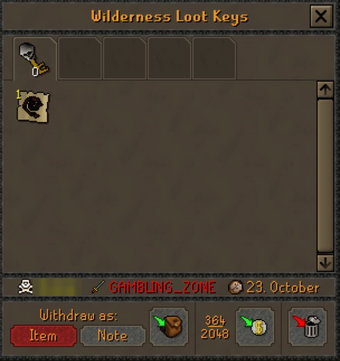
The info line under the loot shows the player the key came from, where it dropped (with a single or multi-combat icon) and the date.
Withdraw as: Item / Note picks whether you withdraw items or banknotes.
Withdraw-To-Inventory takes everything that fits in your inventory.
Withdraw-To-Bank sends everything to your bank. The numbers next to it show how many of your bank slots are used.
Discard-All destroys everything in the key.
Right-click an item in the key for more options:
| Option | What it does |
|---|---|
| Withdraw-1, Withdraw-5, Withdraw-10, Withdraw-X, Withdraw-All | Moves that many to your inventory, as items or notes. |
| Bank-1, Bank-5, Bank-10, Bank-X, Bank-All | Moves that many straight to your bank. |
- Discard-All asks Are you SURE you want to destroy the contents of this loot key? first. If the key is worth more than 5,000 PKP, you confirm a second time.
- When you've taken everything out of a key, the key disappears from your inventory. When there's nothing left to take, the window shows The chest is now empty.
- Skully keeps count of the value you take out of your keys and the value you destroy.
Skully
Skully runs the loot chest at Edgeville home. His right-click options are:
| Option | What it does |
|---|---|
| Talk-to | Explains how the chest and loot keys work, how to change them, and how much loot you've claimed. |
| Value | Shows your loot key statistics: keys opened, total key value kept and total key value destroyed. |
| Settings | Opens the Loot Key & Death Configuration menu. |
Tips
- Keep Drop food & potions to floor on, so you can eat your victim's food during the next fight.
- Lower the value threshold if you'd rather pick up valuable drops yourself, or raise it to keep everything in the key.
- While you're skulled, your keys show on your skull, so other players know you're worth killing. Empty them at a chest often.
- Loot keys don't change what your victim drops, only where it goes.
Commands
| Command | What it does |
|---|---|
::lootkey, ::lootkeys |
Teleports you to Skully and the Loot Chest at Edgeville home. |
See also
| Side tabs | |
|---|---|
| Your account | |
| Getting around | |
| Knowledge Center | |
| Rewards | |
| Activities | |