Name change
A name change gives your account a new display name, the name other players see. Your log-in name never changes, and you keep everything on your account. You change your name from the Display name panel, usually by using a Name change scroll. Going back to your log-in name is always free.
Overview
::donate or the Trading Post.Opening the name changer
| Way in | What opens |
|---|---|
| Player tab › Account Management › Name Changer | The Display name panel. |
| Change-name on a Name change scroll | The Display name panel. |
Name Change FAQ on the panel, or ::name-change-faq |
The Roat Pkz Name Changes FAQ. |

Changing your name
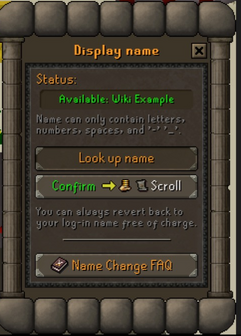
1. Look up name. Type the name you want, up to 12 characters.
2. Check the status. It turns green with Available or red with Rejected.
3. Check the price. The Confirm button shows what the change costs: FREE, a Pk Point price, or Scroll.
4. Confirm twice. The first question tells you the price; the second asks Change your display name to: …?
5. Done. Your new name shows straight away, and the chat confirms it.
Prices
| Change | Price |
|---|---|
| A new name | 1 Name change scroll. It must be in your inventory, and it's used up. |
| Only the capitals, spaces, dashes or underscores of your current name, for example wiki example to Wiki-Example | 100,000 PKP, taken from your Quest tab, inventory or bank. |
| Back to your log-in name | Free |
| Away from a name that starts with Plr | Free |
You can buy a Name change scroll from the store (::donate) or from other players on the Trading post, since it can be traded.
Name rules
| Rule | Details |
|---|---|
| Length | 1 to 12 characters. |
| Characters | Letters, numbers, spaces, dashes (-) and underscores (_). A name can't start or end with a dash or an underscore. |
| One name, many spellings | Capitals don't matter, and spaces, dashes and underscores count as the same character. Wiki Example, wiki-example and Wiki_Example are all the same name. |
| No offensive names | A filter blocks offensive words. Getting around it on purpose will get you punished. |
| Must be available | See below. |
When is a name available?
A name is taken if another player is using it as their display name. It's also taken if it's another player's log-in name and any of these is true:
- that player has changed their display name, which protects their log-in name;
- the account has a donator rank;
- the account has 24 hours or more of playtime;
- the account has logged in within the last 2 years.
If none of these is true, the log-in name of an old, inactive account can be taken. That account is then given a random name starting with Plr, and changing away from it is free.
What changes, and what stays
- Your log-in name stays the same. You keep logging in with it.
- Players can still find you. Anyone can see your log-in name by hovering over your name on their friends, ignore or clan lists. Changing your name twice won't hide it.
- Your log-in name is protected. Once you've changed your name, nobody can take your log-in name.
- Your old display name is released. As soon as you change it, anyone can take your old display name.
- Your clan is unaffected. Players can join your clan chat with your old log-in name or your new display name.
- You keep everything: ranks, kills, deaths, items, hiscores, streaks and Pk Points.
A fresh log-in name
A name change only changes your display name. If you want a completely new log-in name, you can still buy a fresh log-in name for 200 Game Credits. Open a ticket on Discord to arrange it: Create Ticket in the Player tab takes you there.
Commands
| Command | What it does |
|---|---|
::name-change-faq |
Opens the Roat Pkz Name Changes FAQ. |
See also
| Side tabs | |
|---|---|
| Your account | |
| Getting around | |
| Knowledge Center | |
| Rewards | |
| Activities | |