Bank
Your bank (The Bank of Roat Pkz) stores everything you aren't carrying. It has up to 10 tabs, shows the Pk Point value of your whole bank and of each tab, and lets you search by name or by value. How many items it holds depends on your donator rank, from 352 to 2,048. Since most supplies on Roat Pkz can be spawned, your bank is mainly where your rare items live.
Overview
Opening your bank
| Way in | Who can use it |
|---|---|
| Bank booths, bank chests, bankers and Grand Exchange clerks | Everyone |
::bank, anywhere you're allowed to bank |
 Super Donator+ Super Donator+
|
| Use Bank on the Royal Donator orb next to your minimap |  Royal Donator+ Royal Donator+
|
| CTRL+B, the default Open Bank keyboard shortcut | Royal Donator+
|
::bank, the orb and CTRL+B can't be used for 15 seconds after you've been skilling.
Bank slots
| Rank | Bank slots |
|---|---|
| No rank | 352 |
 Donator Donator |
440 |
| Super Donator |
600 |
 Extreme Donator Extreme Donator |
760 |
 Legendary Donator Legendary Donator |
864 |
| Royal Donator |
1,248 |
 Divine Donator Divine Donator |
2,048 |
The numbers in the top left corner of the bank show how many slots you've used and how many your rank gives you. When your bank is full, the chat tells you how much room each higher rank would give.
The bank window
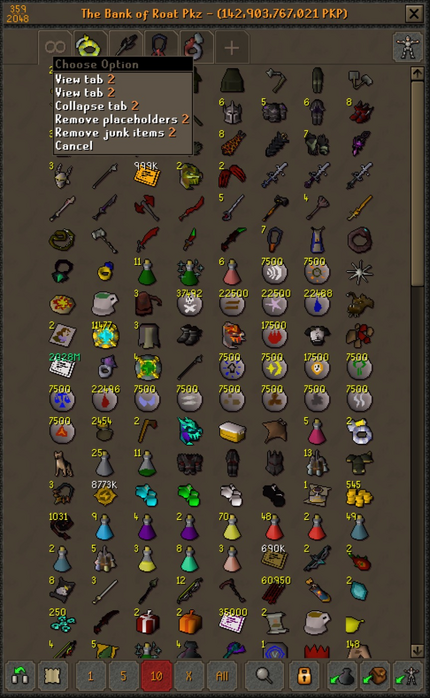
Viewing a tab: the title changes to Tab 2 – (… PKP), the value of that tab alone.
Top left: slots used and slots available.
Top right: Show worn equipment shows what you're wearing and its stats without leaving the bank.
Tabs: the main tab (∞), then your other tabs, then a + for a new one.
Bottom row: see below.
Tabs
The main tab (∞) shows every item in your bank. You can have up to nine more tabs. Each tab's icon is the first item in it.
- Make a tab: drag an item onto the +.
- Move items: drag an item onto another tab's icon to move it into that tab.
- Reorder tabs: drag one tab's icon onto another to swap the two tabs.
Right-click a tab for more options. Each one asks you to confirm first.
| Tab | Option | What it does |
|---|---|---|
| Main tab (∞) | View all items | Shows your whole bank. |
| Remove placeholders | Removes every placeholder in your bank. | |
| Remove all junk items from bank | Deletes every item with no value, which is every spawnable item. Your rare items stay. | |
| Tabs 1–9 | View tab | Shows that tab. |
| Collapse tab | Moves all of the tab's items to the main tab and removes the tab. Nothing is lost. | |
| Remove placeholders | Removes the placeholders in that tab. | |
| Remove junk items | Deletes the items with no value from that tab. |
The bottom row
| Button | What it does |
|---|---|
| Swap / Insert | How dragging rearranges items: swap two items, or insert an item and shift the rest along. |
| Notes | Withdraw items as notes. Items that can't be noted come out as normal items. |
| 1, 5, 10, X, All | The default quantity: what a left-click withdraws or deposits. X uses the last amount you typed. |
| Search | Search your whole bank (see Searching). |
| Always set placeholders (padlock) | When it's on, taking out the last of an item leaves a placeholder, so the item keeps its spot. It's on by default. |
| Empty containers | Empties your Looting bag into your bank. |
| Deposit inventory | Banks everything you're carrying. |
| Deposit worn items | Banks everything you're wearing. |
Right-click an item for every amount: Withdraw-1, -5, -10, your last X amount, -X, -All and -All-but-1. Items in your inventory have matching Deposit options, from Deposit-1 to Deposit-All. When your default quantity isn't 1, that amount moves to the top of the menu.
Searching
Click Search and start typing. Matching items from every tab show up as you type, and the title reads Searching Bank for: and your search.
- By name: type any part of an item's name.
- By value: start with < or > and an amount, using k, m or b for thousands, millions and billions.
<10mshows stacks worth 10M PKP or less, and>1mshows stacks worth 1M PKP or more. The value is for the whole stack, not one item.
Starter supplies
The first time you open an empty bank, the banker offers to fill it with basic supplies: food, potions, melee, magic and range armour, runes and more. Choose Yes Please to get them or No Thanks to skip. You're only asked once.
Everything in the starter kit can be spawned, so it has no value. To clear it out again, use ::removealljunkfrombank or Remove all junk items from bank on the main tab.
Where you can't bank
You'll see You can not bank right here if you try to bank:
- in the Wilderness or any other PvP zone;
- in dangerous monster areas: raids, boss instances, the King Black Dragon lair, the Corporeal Beast cave, the Kraken cave, Zulrah's shrine, the Tormented Demons, the Abyss and runecrafting altars;
- at Barrows;
- during a duel, trade or gamble, or while you're teleporting;
- in most minigames. In a tournament you can only bank in the lobby, and in the Clan Cup only while your team is banking.
Tips
- A Demon's heart and loot keys can't be put in the bank.
- During an automatic tournament, the bank shows the tournament's supplies instead of your own items.
- Remove junk items and
::removealljunkfrombankonly delete items with no value, so they're safe to use on a bank full of rares. The removed items can be spawned again for free. - Compare the title's value with the Trading Post value in its tooltip to see whether the guide prices or the market value your bank higher. See Item prices.
- Your bank also counts towards your Net worth.
Commands
| Command | What it does |
|---|---|
::bank |
Opens your bank, anywhere you're allowed to bank (Super Donator+). |
::removealljunkfrombank |
Removes every item with no value from your bank, after asking you to confirm. |
See also
| Side tabs | |
|---|---|
| Your account | |
| Getting around | |
| Knowledge Center | |
| Rewards | |
| Activities | |