Spawning items
Jump to navigation
Jump to search
Spawning items
Roat Pkz is a spawn server: search for any item that isn't rare and spawn it straight into your inventory, for free.
::getid
Spawning items is how you get your supplies on Roat Pkz. The item spawner is a search window that opens in your chatbox: type part of an item's name, then click a result to put it in your inventory for free. You can spawn any item that isn't rare. Rare items have to be earned in game or bought from other players.
⚡
The rule to remember: rare items are shown in grey in the spawner and can't be spawned. Everything else is free, as often as you like.
Overview
Free
Every item that isn't rare
Weapons, armour, food, potions and runes cost nothing.
1 · 5 · 10 · 100 · X
Spawn amounts
Left-click spawns one. Right-click for the other amounts.
Noted
With Spawn X Items
Choose your own amount and you get the item noted, if it can be noted.
Safe areas
Where you can spawn
Not in PvP zones, not while under attack, and not in a trade, duel or gamble.
Opening the item spawner
| Way in | How | Who can use it |
|---|---|---|
| Search icon | Click the small search icon at the bottom right of your chatbox, just below the chat scroll bar. Its option is Search for items. | Everyone |
::getid name |
Opens the spawner already searching for that name, for example ::getid rune. |
Everyone |
Searching
The window title reads What would you like to spawn? followed by what you type. Results update as you type, in three columns:
- Type any part of a name. rune finds runes, rune armour and everything else with "rune" in its name.
- Up to 90 results show at once. If you can't see the item you want, type a few more letters.
- With nothing typed, the spawner shows a list of common PvP supplies, such as weapons, armour, potions, food and runes.
- Rare items are still listed, in grey, so you can see that they exist.
- Noted items aren't listed separately. Use Spawn X Items to get an item noted.
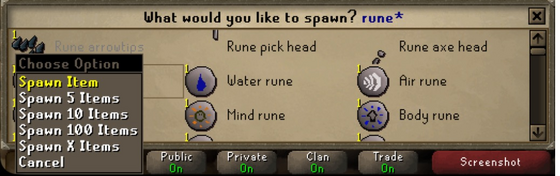
Searching rune and right-clicking a result. Rune arrowtips are rare, so they are shown in grey.
Spawning
| Option | You get |
|---|---|
| Spawn Item (left-click) | 1 |
| Spawn 5 Items | 5 |
| Spawn 10 Items | 10 |
| Spawn 100 Items | 100 |
| Spawn X Items | Any amount you type. If the item can be noted, you get it noted, so even a large amount only takes one slot. |
Items go straight into your inventory. Stackable items such as runes stack in one slot, and other items fill your free slots. If you have no room, the spawner tells you there isn't enough space.
What you can spawn
- Any item that isn't rare. The spawner tells you You can not spawn this item if you try a rare one.
- Rare items are the ones worth Pk Points. You earn them from PvP, bosses, crates and point shops, or buy them from other players on the Trading post. See Item prices for what they're worth.
- Spawnable items count as junk. They have no Pk Point value, so they don't add to your Net worth, and they can't go in a Looting bag.
Where you can't spawn
| You can't spawn… | Details |
|---|---|
| In the Wilderness or a PvP zone | Spawn everything you need before you go. |
| While under attack | Wait until the fight is over. |
| In a trade, duel or gamble | Finish or decline it first. |
| While price checking | Close the price checker first. |
| In dangerous monster areas | Raids, boss instances, the King Black Dragon lair, the Corporeal Beast cave, the Kraken cave, Zulrah's shrine, the Tormented Demons, the Abyss and runecrafting altars, and at Barrows. |
| In minigames | Spawning is turned off in minigames. In the Clan Cup you can only spawn in the bank lobby. |
The quick supply commands follow the same rules and tell you to go to a safe zone.
Related features
- Custom kits spawn their non-rare items for you when you load a kit, and you add items to a kit with the same search window.
- Best in slot has an Only Spawnables filter, to see the best gear you can spawn.
- Bank tabs have a Remove junk items option that clears out every spawnable item at once. They're free to spawn again.
Tips
::getidis the fastest way in:::getid dragonopens the spawner already searching for "dragon".- Use Spawn X Items for potions and food you want in bulk: they arrive noted.
::anglersand::marlinsare not spawns. Anglerfish and marlins are rare, so these commands move your own fish from your bank into your inventory.- Each time you load a custom kit, its spawnable items are spawned for you, so you rarely need the spawner for a full setup.
Commands
| Command | What it does |
|---|---|
::getid name |
Opens the item spawner searching for name. |
::item id amount |
Spawns an item by its item ID. |
::food |
Fills your free inventory slots with  dark crabs. dark crabs.
|
::veng |
5,000 each of death, astral and earth runes, and offers to switch you to the Lunar spellbook. |
::barrage |
5,000 each of water, death and blood runes, and offers to switch you to Ancient Magicks. |
::bloodbarrage |
5,000 each of soul, death and blood runes, and offers to switch you to Ancient Magicks. |
::tb |
5,000 each of death, chaos and law runes for Teleblock, and offers to switch you to the standard spellbook. |
::bind |
5,000 each of earth, water and nature runes, and offers to switch you to the standard spellbook. |
::runes |
2,500 of each rune that isn't rare. |
::anglers, ::marlins |
Moves your anglerfish or marlins from your bank into your inventory. |
See also
| Side tabs | |
|---|---|
| Your account | |
| Getting around | |
| Knowledge Center | |
| Rewards | |
| Activities | |