Lottery

The Lottery is a PK point pot that anyone can enter. Add PK points or valuable items to the pot, and when the timer runs out, one entrant wins it. Your chance of winning is your share of the pot, so the more you put in, the better your chance. The winner gets the pot minus a 15% tax. Open the lottery with ::lottery or at the Lottery Master at Edgeville home. It's one of the gambling activities on Roat Pkz.
Overview
Opening the lottery
| Way in | What it does |
|---|---|
::lottery or ::lotto |
Opens the lottery window. |
| The Lottery Master › Talk-To › Join the Lottery! or Current Lottery Status | Opens the lottery window. |
| The Lottery Master › Quick-Add or Lottery Status | Opens the lottery window straight away. |

The Lottery Master stands next to Skully and the loot chest at Edgeville home, and in other areas such as the Donator Zone. His right-click options are:
| Option | What it does |
|---|---|
| Talk-To | Offers Join the Lottery!, Current Lottery Status, How does it work? and Cancel. The first two open the lottery window. How does it work? explains the draw and the tax. |
| Quick-Add | Opens the lottery window. |
| Lottery Status | Opens the lottery window. |
| Use an item on him | Adds that item to the lottery, after a confirmation that shows what it's worth. |
While a lottery runs, the Lottery Master calls out the pot and the time left, and right after a draw he announces the winner.
The lottery window
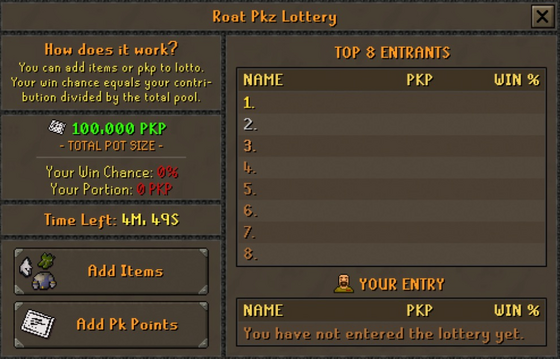
Total pot size: how much PKP is in the pot.
Your Win Chance and Your Portion: your chance to win and how much you've put in.
Time Left: the time until the draw.
Add Items and Add Pk Points: enter the lottery.
Top 8 Entrants: the biggest entries, with their PKP and win chance.
Your Entry: your place, your PKP and your win chance.
Entering
You can add to the pot as often as you like before the draw. Each time, a confirmation shows how much you're adding and what your win chance will become, with the warning No refunds. Once you confirm, your PK points or items are gone, whether you win or not.
Adding PK points
Click Add Pk Points in the lottery window, or type ::addlottery, and enter how many PK points to add. The points are taken from your Quest tab and your inventory.
Adding items
Click Add Items to open the item screen, then click items in your inventory to move them in (Add, Add-5, Add-10, Add-All or Add-X). The bag button adds every item that qualifies in one go. The screen shows the total your items are worth to the lottery, along with the current pot, your win chance and the time left. Click Add Items to confirm, or Cancel to get your items back. As the screen says, These items turn into Pk Points once deposited into the lottery.
You can also use a single item on the Lottery Master to add it. If you have more than one, he asks how many.
| Items | Can you add them? |
|---|---|
| Items with a PK point value that can't be spawned | Yes, at 75% of their value |
| PK points (the item) | Yes, at their full value |
| Items you can spawn, and items with no PK point value | No: You can only add items that are valuable to the lottery. |
| Loot keys | No |
| Untradeable pets | No: You can not add Pets to the lottery - sorry. |
Winning
When the timer runs out, the lottery picks a winner at random. Your chance is your share of the pot: every PK point you put in counts the same, so putting in a quarter of all the PKP entered gives you a 25% chance. The window and the confirmations always show your exact chance.
| Rule | What it means |
|---|---|
| 15% tax | 15% of the pot is taken as tax, and the winner gets the other 85%. A 1,000,000 PKP pot pays the winner 850,000 PKP. |
| You never lose more than you put in | If 85% of the pot would be less than what the winner put in, they get back what they put in instead. |
- The win is announced in chat with the winner's name, the PKP they won and their win chance.
- Everyone who has the lottery window open sees a Lottery Winner! pop-up with the winner, their win chance, the PKP they won and how much PKP the lottery took out of the economy. If you won, click Claim to collect your PK points.
- You can also claim your winnings at any time with
::claimlottery. They go straight to your Quest tab. Until you claim, a chat message reminds you every so often. - Unclaimed winnings don't expire.
The timer
A new lottery starts as soon as the last one is drawn. How long it runs depends on the size of the pot that was just drawn:
| Last pot | Next lottery runs for |
|---|---|
| Under 1,000,000 PKP | 26 minutes |
| 1,000,000 PKP or more | 21 minutes |
| 5,000,000 PKP or more | 16 minutes |
| 10,000,000 PKP or more | 11 minutes |
| 25,000,000 PKP or more | 6 minutes |
- Big pots end sooner. Once the pot reaches 1,000,000 PKP, the timer drops to 5 minutes if more time than that is left.
- Last-minute entries add time. In the last minute, an entry of 25,000 PKP or more adds a few seconds to the clock, and an entry of 100,000 PKP or more adds a few more. The announcement says how many.
- Announcements. Chat messages tell everyone the pot and the time left at 10 minutes, 5 minutes, 1 minute, 30 seconds, 10 seconds and 5 seconds. Entries of 25,000 PKP or more are announced too, and a message lets everyone know when a new lottery has started.
Where you can't enter
| Situation | What happens |
|---|---|
| In the Wilderness or any other PvP area | You can not enter the lottery in a PvP zone. |
| During a duel or a gamble | You can not enter the Lottery here. |
| During a minigame | You can not enter the lottery during a mini-game. |
| In the last few minutes before a server update | You can not enter the lottery during the update. |
Tips
- Check Your Win Chance and the Top 8 Entrants before you add more. The confirmation always shows your new chance first.
- Adding items costs you a quarter of their value, so adding PK points gives you a bigger share for the same value.
- You don't need to watch the draw: if you win, use
::claimlotterywhenever you like. - Treat the lottery as a gamble. Only put in what you're happy to lose.
Commands
| Command | What it does |
|---|---|
::lottery, ::lotto |
Opens the lottery window. |
::addlottery |
Asks how many PK points to add to the lottery. |
::claimlottery |
Claims your lottery winnings. |
See also
| Side tabs | |
|---|---|
| Your account | |
| Getting around | |
| Knowledge Center | |
| Rewards | |
| Activities | |