Custom kits
Custom kits save your current setup so you can load it again in a second. A kit remembers your worn equipment, all 28 inventory slots, your seven combat levels, your spellbook, the runes in your rune pouch and divine rune pouch, the ammo in your Dizana's quiver and your quick prayers. Loading a kit puts your rare items in your bank, spawns everything in the kit that isn't rare for free, and takes the rare items the kit needs out of your bank. Every player has 5 kit slots, and donator ranks unlock up to 60. If you just want a common build, the Pre-Made Kits tab has ready-made kits.
Overview
Opening Custom Kits
| Way in | Notes |
|---|---|
::kits, ::kit, ::customkit or ::customkits |
Opens the window on kit 1. |
| Player tab › Knowledge Center › Custom Kits | The button is in the Your Data section. |
| Pre-Made Kits tab › Custom Kits | The big button at the top of the last side tab. |
| Quest tab › Kit | Click an empty slot to open it, or click a saved kit and choose Edit Kit. |
| CTRL + F (CMD + F on a Mac) | The default keyboard shortcut. |
Kit slots
How many kits you can save depends on your donator rank:
| Rank | Kit slots |
|---|---|
| No rank | 5 |
 Donator Donator |
8 |
 Super Donator Super Donator |
15 |
 Extreme Donator Extreme Donator |
20 |
 Legendary Donator Legendary Donator |
25 |
 Royal Donator Royal Donator |
40 |
 Divine Donator Divine Donator |
60 |
Slots you haven't unlocked show as Donator Only in the kit list, with the icon of the rank that unlocks them. Clicking one tells you which rank you need.
The Custom Kits window
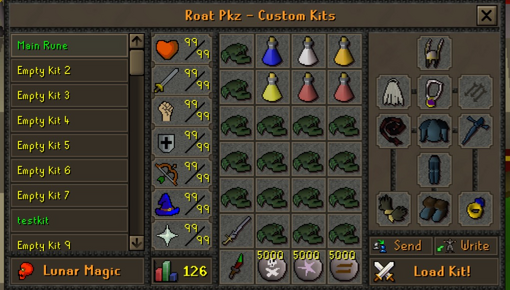
Levels: the kit's Hitpoints, Attack, Strength, Defence, Ranged, Magic and Prayer, with its combat level at the bottom.
Inventory and equipment: what the kit loads. A Dizana's quiver slot appears next to the gear when the kit has a quiver.
Spellbook (bottom left): Modern, Ancient or Lunar Magic.
Send, Write and Load Kit! (bottom right).
Selecting an empty slot shows a Create Custom Kit! button instead of the kit.
Saving a kit
Set yourself up the way you want the kit: wear the gear, fill your inventory, and set your levels, spellbook, rune pouches and quick prayers. Then select an empty slot, click Create Custom Kit! (or Write) and type a name of up to 40 characters. The kit saves your setup exactly as it is at that moment.
To update a kit later, select it and click Write, or right-click it and choose Overwrite. After you confirm, it's replaced with your current setup and keeps its name.
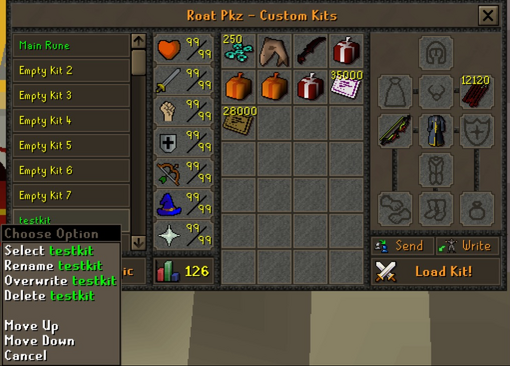
| Option | What it does |
|---|---|
| Select | Shows the kit in the window. |
| Rename | Gives the kit a new name, up to 40 characters. |
| Overwrite | Replaces the kit with your current setup after a Yes/No check. On an empty slot it creates a new kit. |
| Delete | Deletes the kit after you choose Yes - Delete Kit. |
| Move Up, Move Down | Swaps the kit with the one above or below it. This also changes its number, and so its Load Kit key. |
Editing a kit
You can change a saved kit without gearing up again:
- Items: right-click an empty inventory or equipment slot and choose Add Item, or right-click an item and choose Edit or Remove. This opens a search in the chat box (What item would you like to add?). Type part of a name, then right-click a result and choose Add 1, Add 5, Add 10, Add X or Add All. Equipment slots only list items you can wear. Rare items are listed too, because a kit can hold them: they come out of your bank when you load it.
- Noted stacks: in an inventory slot, Add X adds the item noted when it can be noted.
- Moving items: drag items around the kit's inventory to rearrange it.
- Two-handed weapons: putting one in the weapon slot clears the shield slot, and adding a shield clears a two-handed weapon.
- Levels: click a level and type a new one from 1 to 99. If the kit's gear needs a higher level, the kit raises it and tells you.
- Spellbook: click the spellbook button to choose Modern, Ancient or Lunar Magic, or right-click it and choose Swap-to.
- Quiver ammo: when the kit has a Dizana's quiver, use the quiver slot next to the gear to set its ammo.
Loading a kit
Select a kit and click Load Kit!. You can also load kits from the Quest tab, with keyboard shortcuts, and (for Royal Donators and above) from the Kits tab icon. Loading a kit:
- Puts every rare item you're wearing or carrying in your bank. Everything else is removed: you can spawn it again for free, so nothing of value is lost.
- Sets your combat levels and spellbook to the kit's, and cures poison, venom and burns.
- Puts on the kit's gear and fills your inventory. Items that aren't rare are spawned for free. Rare items are taken from your bank: if you have fewer than the kit lists, you get what you have, and if you have none, that slot stays empty and a chat notice tells you.
- Fills your rune pouch, divine rune pouch and Dizana's quiver if the kit loads them. The pouches and the quiver are rare themselves, so they come from your bank, and so do rare runes such as wrath and sunfire runes.
- Sets your quick prayers to the kit's.
- Turns off your active prayers and clears an active Vengeance.
- Raises any level your worn gear needs, with a notice suggesting you overwrite the kit.
Kits never hold items. Your rare items stay in your bank until a kit loads them, and go back to your bank when you load the next kit. If you sell or lose a rare item, the kit simply loads without it.
Kits also handle degradable PvP gear, such as Vesta's, Statius's, Zuriel's and Morrigan's equipment (and their corrupted versions). If the kit lists a fresh piece but your bank has a used (deg) one, the used one is loaded. If the kit lists a (deg) piece you no longer have but you own a fresh one, the fresh one is loaded.
Where you can load a kit
| Rule | Details |
|---|---|
| Safe zone | Only where you can spawn items: not in PvP zones, dangerous PvM areas such as boss instances, or Barrows, and not during a trade, duel or gamble or while price checking. Otherwise: You must be in a Safe Zone to load a kit! |
| Not under attack | You can not load a kit while under attack. |
| 15 seconds after skilling | You have to wait 15 seconds after skilling before you can load a kit. |
| No unbankable items | Loot keys and the Mage Arena II items (Demon's heart, Ent's roots and Justiciar's hand) can't be banked, so use them before loading a kit. |
| Bank space | Your bank needs room for your rare items: Your bank is full! please free up some space before loading the kit. |
| Minigames | Kits can't be loaded in minigames, except in the Clan Cup bank lobby. |
Sharing kits
- Send: select a kit, click Send and type the name of an online player. They get a copy of the kit and a chat message saying who sent it. Only the last kit sent to someone is kept.
- ::load-kit: loads the kit someone sent you, following the normal loading rules.
- ::save-kit: saves the kit someone sent you into your first free kit slot.
The sender gets a message when you load or save their kit. A shared kit only loads the rare items you own yourself.
You can also copy a clan mate's setup. In a clan chat, right-click a member and choose Copy-Kit to send a request. They need Allow Copy Kit set to Yes in Clan Setup, and they have to accept. Their current gear, inventory, levels and spellbook then load for you, just like a kit.
Keyboard shortcuts
| Keys | Default action |
|---|---|
| CTRL + F | Open Custom Kits |
| CTRL + R | Load Last Kit: loads the custom kit you loaded last. |
| CTRL + 1 … CTRL + 9, CTRL + 0 | Load Kit 1 … Load Kit 10 |
Use CMD instead of CTRL on a Mac, and change the keys in Keyboard shortcuts. Load Last Kit remembers kits loaded from the Custom Kits window, the Quest tab, the Kits tab icon or a Load Kit key; pre-made kits and kits sent to you don't count.
Royal Donators and above can also right-click the Kits tab icon (the last side tab) and choose Load and a kit's name to load it straight away.
Pre-Made Kits tab
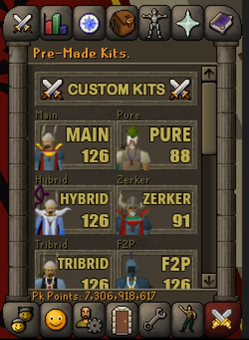
- The Custom Kits button at the top opens your own kits.
- Below it are six ready-made kits. Click one and pick a version.
- Lower down are four supply buttons, then buttons for the vote site, the forum and the store.
- Your Pk Points show at the bottom of the tab.
| Kit | Versions | Spellbook | Attack | Defence | Strength | Hitpoints | Ranged | Prayer | Magic | Combat |
|---|---|---|---|---|---|---|---|---|---|---|
| Main | Main Rune (SS), Main Rune (Mace/SS), Main Granite (Mace) | Lunar | 99 | 99 | 99 | 99 | 99 | 99 | 99 | 126 |
| Pure | Pure Melee, Pure Melee & Range, Pure Nh | Modern (Nh: Ancient) | 75 | 1 | 99 | 99 | 99 | 52 | 99 | 88 |
| Hybrid | Hybrid (4 way), Hybrid (5 way), Hybrid (6 way) | Ancient | 99 | 99 | 99 | 99 | 99 | 99 | 99 | 126 |
| Zerker | Zerker | Lunar | 60 | 45 | 99 | 90 | 99 | 52 | 99 | 91 |
| Tribrid | Tribrid | Ancient | 99 | 99 | 99 | 99 | 99 | 99 | 99 | 126 |
| F2P | F2P Melee, F2P Range, F2P Magic | Modern | 99 | 99 | 99 | 99 | 99 | 99 | 99 | 126 |
The supply buttons spawn items straight into your inventory, so they work wherever you can spawn items:
| Button | What you get |
|---|---|
| Food |  Dark crab in every free inventory slot. Dark crab in every free inventory slot.
|
| Potions |  Super attack(4), Super attack(4),  Super strength(4), Super strength(4),  Super defence(4), Super defence(4),  Saradomin brew(4) and two Saradomin brew(4) and two  Sanfew serum(4). Sanfew serum(4).
|
| Vengeance | 5,000 each of  death, death,  astral and astral and  earth runes. If you're not on the Lunar spellbook, it offers to switch you. earth runes. If you're not on the Lunar spellbook, it offers to switch you.
|
| Barrage | 5,000 each of death,  water and water and  blood runes. If you're not on the Ancient spellbook, it offers to switch you. blood runes. If you're not on the Ancient spellbook, it offers to switch you.
|
Quest tab Kit lines
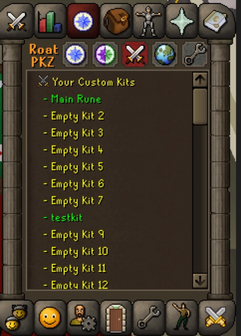
- Click a green line (a saved kit) to choose Load and the kit's name, or Edit Kit.
- Click a yellow line (Empty Kit 5) to open Custom Kits on that slot.
- A red line (Locked for ... Donators) is a slot your rank hasn't unlocked. Its icon shows the rank you need.
Tips
- Keep your rare items in your bank. A kit loads them from there, and puts them back when you load another kit.
- Put the kits you use most in slots 1 to 10 so they have their own CTRL keys. Moving a kit up or down changes its number.
- Loading a kit is the fastest way to change all your combat levels at once. See Setting levels.
- Use Add X to put a noted stack in a kit's inventory.
- If a kit won't load right after skilling, wait 15 seconds and try again.
- Use your loot keys and Mage Arena II items before loading a kit, because they can't be banked.
Commands
| Command | What it does |
|---|---|
::kits, ::kit, ::customkit, ::customkits |
Opens Custom Kits. |
::load-kit, ::loadkit |
Loads the kit someone sent you. |
::save-kit, ::savekit |
Saves the kit someone sent you to your first free slot. |
::keybinds |
Opens Keyboard shortcuts, where you can change the kit keys. |
See also
- Setting levels
- Spawning items
- Bank
- Keyboard shortcuts
- Quest tab
- Rune pouch
- Blessed dizana's quiver
- Ornament kit
| Side tabs | |
|---|---|
| Your account | |
| Getting around | |
| Knowledge Center | |
| Rewards | |
| Activities | |