Keyboard shortcuts
Keyboard shortcuts let you do common jobs with one key press. The Roat Pkz Keyboard Shortcuts window binds an action to each of 34 keys: hold CTRL (CMD on a Mac) and press the key to use it. Out of the box they load your custom kits, spawn food and open your kits, and Royal Donators also get the bank, shops, teleports and restores. A second window, Keybinding, sets which F-key (or Esc) opens each side tab, with a Roat and an OSRS layout to start from.
Overview
Opening the windows
| Window | How to open it |
|---|---|
| Roat Pkz Keyboard Shortcuts | ::keybinds (also ::keybind, ::keybinding, ::shortcuts, ::shortcut, ::bindkey, ::bindkeys, ::keyboard, ::keyboardshortcut, ::keyboardshortcuts, ::keyshortcuts); Player tab › Knowledge Center › Keyboard Shortcuts; Quest tab › Settings › Customize Shortcuts.
|
| Keybinding (F-keys) | ::fkeys or ::fkey; Player tab › Knowledge Center › F-Keys; Quest tab › Settings › Customize F-Keys; Settings tab › Controls › Set F-Keys.
|
The Keyboard Shortcuts window
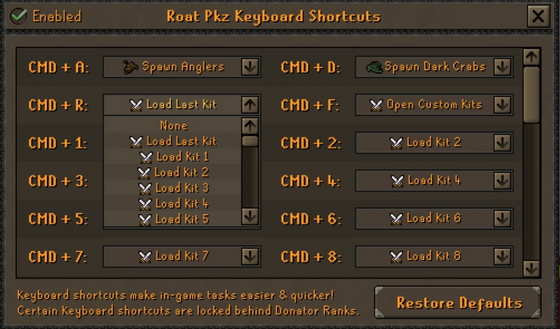
- Each key has a dropdown. Pick an action and it's saved straight away. Pick None to leave a key free.
- Hold CTRL and press the key to use the action. On a Mac, hold CMD instead; the window shows CMD or CTRL to match your computer. Holding Alt at the same time doesn't trigger a shortcut.
- The Enabled tick box in the top left switches all shortcuts on or off. Its tooltip reads When enabled, all shortcuts below will be active.
- Restore Defaults sets every key back to its default action after you confirm.
- Actions written in cyan need Royal Donator or higher, and the green one needs Divine Donator. You can pick them at any rank, but using one without the rank tells you which rank you need.
- Your shortcuts are saved on your account, so they follow you to any computer.
Default shortcuts
These are the actions every account starts with. Eleven keys have no default action, so you can fill them with whatever you use most.
| Key | Default action | Needs |
|---|---|---|
| CTRL + A | Spawn Anglers | Everyone |
| CTRL + D | Spawn Dark Crabs | Everyone |
| CTRL + R | Load Last Kit | Everyone |
| CTRL + F | Open Custom Kits | Everyone |
| CTRL + 1 … CTRL + 9 | Load Kit 1 … Load Kit 9 | Everyone |
| CTRL + 0 | Load Kit 10 | Everyone |
| CTRL + B | Open Bank | Royal Donator |
| CTRL + S | Open Shops | Royal Donator |
| CTRL + E | Open Teleports | Royal Donator |
| CTRL + W | Restore Special | Royal Donator |
| CTRL + Q | Restore Health | Royal Donator |
| CTRL + T | Open Trading Post | Royal Donator |
| CTRL + X | Restore Prayer | Royal Donator |
| CTRL + Z | Cure Poison | Royal Donator |
| CTRL + H | Teleport Home | Royal Donator |
| CTRL + G, Y, U, I, O, P, M, N, J, K and L | None: free for you to set | |
All actions
Every key can be set to any of these actions.
| Action | What it does | Needs |
|---|---|---|
| Kits and supplies | ||
| Load Last Kit | Loads the custom kit you loaded last. Pre-made kits and kits sent to you don't count. | Everyone |
| Load Kit 1 … Load Kit 10 | Loads that custom kit slot. | Everyone |
| Open Custom Kits | Opens the Custom Kits window. | Everyone |
| Spawn Dark Crabs | Fills every free inventory slot with  dark crabs, like dark crabs, like ::food. |
Everyone |
| Spawn Anglers | Takes as many  anglerfish out of your bank as your inventory holds, like anglerfish out of your bank as your inventory holds, like ::anglers. Anglerfish are rare, so they come from your bank. |
Everyone |
| Spawn Marlins | Takes as many  marlins out of your bank as your inventory holds, like marlins out of your bank as your inventory holds, like ::marlins. |
Everyone |
| Display My Risk | Says your current risk in public chat, like ::myrisk. |
Everyone |
| Royal Donator and higher (cyan) | ||
| Open Bank | Opens your bank wherever banking is allowed. | Royal Donator |
| Open Trading Post | Opens the Trading post. | Royal Donator |
| Open Teleports | Opens the teleport window. | Royal Donator |
| Use Last Teleport | Repeats your last teleport from the teleport window. Dangerous teleports still ask you to confirm. | Royal Donator |
| Teleport Home | Teleports you home, like ::home. |
Royal Donator |
| Activate Pk Skull | Gives you a PK skull for 20 minutes, like ::skull. See Skulling. |
Royal Donator |
| Remove Pk Skull | Removes your PK skull, like ::unskull. |
Royal Donator |
| Open Shops | Opens the shops, starting with the Pk point shop, wherever banking is allowed. | Royal Donator |
| Empty Inventory | Asks if you want to empty your inventory, like ::empty. Safe zones only. |
Royal Donator |
| Restore Special | Refills your special attack, like ::spec, with the same cooldown. |
Royal Donator |
| Restore Health | Refills your Hitpoints, Prayer and run energy and cures poison and venom, like ::hp. |
Royal Donator |
| Restore Prayer | Refills your Prayer points. | Royal Donator |
| Cure Poison | Cures poison and venom. | Royal Donator |
| Divine Donator (green) | ||
| Open Loot Keys | Opens the loot key window for the keys you're carrying, without going to the loot chest. You can't use it in PvP zones or minigames. | Divine Donator |
| Gambling (only while that game's window is open) | ||
| Bet, Hit, Stand, Double, Split | Presses that button at the Blackjack table. | Everyone |
| Bet, Random Tile, Cashout | Presses that button in Mines. | Everyone |
| Roll Dice | Rolls in Dice. | Everyone |
The restore actions follow the same rules as the restore commands: you can't use them under attack, in PvP zones, dangerous PvM areas, raids, minigames, the Duel Arena or Barrows. Restore Special also can't be used right after you leave a PvP zone.
F-keys
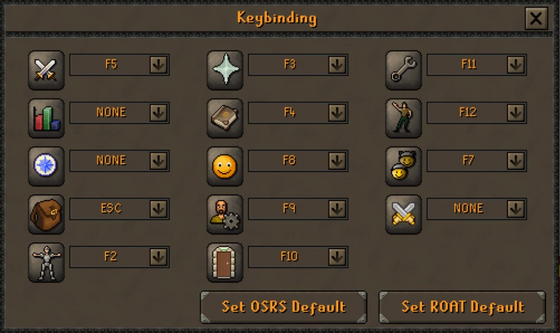
The Keybinding window sets which key opens each of the 14 side tabs. Pick F1 to F12, ESC or NONE from a tab's dropdown. Giving a key to one tab takes it away from the tab that had it. Two buttons load a full layout: Set ROAT Default and Set OSRS Default. The Roat layout is the one you start with.
| Side tab | Roat layout | OSRS layout |
|---|---|---|
| Combat Options | F5 | F1 |
| Skills | None | F2 |
| Quest tab | None | F3 |
| Inventory | Esc and F1 | Esc |
| Worn Equipment | F2 | F4 |
| Prayer | F3 and F6 | F5 |
| Magic | F4 | F6 |
| Clan Chat | F7 | F7 |
| Friends List | F8 | F8 |
| Player tab | F9 | F9 |
| Logout | F10 | None |
| Settings | F11 | F10 |
| Emotes | F12 | F11 |
| Kits (Pre-Made Kits) | None | F12 |
In the Roat layout, F1 also opens the Inventory and F6 also opens Prayer; the window lists them as ESC and F3. Esc first closes any window you have open. If nothing is open, it opens the tab bound to Esc.
Your F-keys are saved by your game client, not your account, so set them again on a new computer.
Tips
- Put the kits you use most in slots 1 to 10 of Custom kits so they each have a CTRL key. Moving a kit up or down in the kit list changes its number.
- CTRL + R (Load Last Kit) is a quick way to re-gear after a fight.
- CTRL + C copies what you've typed in the chat box, and CTRL + V pastes into it (CMD on a Mac). C and V aren't among the shortcut keys.
- If shortcuts stop working, check that Enabled is ticked in the Keyboard Shortcuts window.
Commands
| Command | What it does |
|---|---|
::keybinds, ::shortcuts and the other names above |
Opens Roat Pkz Keyboard Shortcuts. |
::fkeys, ::fkey |
Opens the Keybinding (F-keys) window. |
::food, ::anglers, ::marlins |
The same as the Spawn Dark Crabs, Spawn Anglers and Spawn Marlins actions. |
::myrisk |
The same as Display My Risk. |
::kits |
Opens Custom kits. |
See also
| Side tabs | |
|---|---|
| Your account | |
| Getting around | |
| Knowledge Center | |
| Rewards | |
| Activities | |