Setting levels
On Roat Pkz you don't train your combat skills: you set them. Click Attack, Strength, Defence, Hitpoints, Ranged, Prayer or Magic in the Skills tab, type the level you want, and it changes straight away at no cost. This lets you switch between a maxed main, a pure or any build in between whenever you want. You need to be in a safe zone and out of combat, and the gear you're wearing can stop a level from going lower. Loading a custom kit sets all seven combat levels at once.
Overview
How to set a level
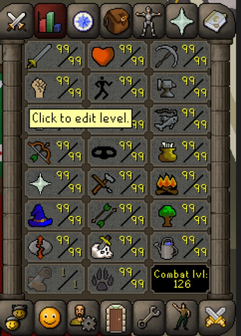
- Open the Skills tab, the second icon in the top row.
- Click a combat skill. Its tooltip says Click to edit level.
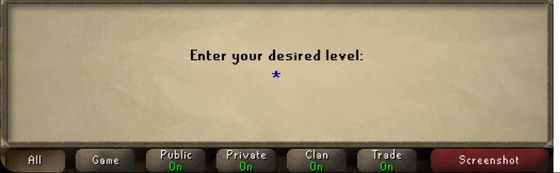
- At Enter your desired level:, type the level you want and press Enter.
Where you can change levels
You have to be in a safe zone and not under attack.
| Where | Can you change levels? |
|---|---|
| Safe zones, such as home | Yes |
| PvP zones, such as the Wilderness | No: Please go to a Safe Zone to use this function. |
| Dangerous PvM areas, such as boss instances or the Corporeal Beast's cave | No: Please go to a Safe Zone to use this function. |
| Under attack | No: You can not change your levels while under attack. |
| During a duel | No |
| During a raid | No: You can not change levels during a Raid. |
| Most minigames | No: You can not change levels in this Mini-Game. |
| Castle Wars | Only before the game starts |
| Clan Cup | Only in the bank lobby |
Gear and prayers
Your gear never stops you raising a level, only lowering one.
Other skills
Clicking any other skill opens its skill guide, which lists what you unlock at each level. Skill guides are available for Mining, Smithing, Fishing, Agility, Thieving, Herblore, Cooking, Woodcutting, Firemaking, Crafting, Fletching, Runecrafting, Farming, Hunter and Slayer. Hover over one of these skills to see your XP and the XP you need for the next level.
These skills can't be set. You train them the normal way (see Skill training guides), and you can speed them up with an XP lamp.
Kits and pre-made kits
A custom kit saves your seven combat levels with your gear, and loading it sets them all in one go. If you just want a common build, the Pre-Made Kits tab has ready-made kits:
| Kit | Attack | Defence | Strength | Hitpoints | Ranged | Prayer | Magic | Combat |
|---|---|---|---|---|---|---|---|---|
| Main, Hybrid, Tribrid, F2P | 99 | 99 | 99 | 99 | 99 | 99 | 99 | 126 |
| Pure | 75 | 1 | 99 | 99 | 99 | 52 | 99 | 88 |
| Zerker | 60 | 45 | 99 | 90 | 99 | 52 | 99 | 91 |
Game modes
Both game modes, Normal and Hardcore PvP, can set any combat skill level.
Tips
- Take your gear off before you lower a level, or the game stops at your gear's requirement.
- To make a 1 Defence pure, remove anything that needs Defence first, then set Defence to 1.
- After changing Prayer or Defence, check your prayers: some may have switched off.
- There are no
::masteror::purecommands. Typing them reminds you to use the Skills tab for levels and the Kits tab for kits.
See also
| Side tabs | |
|---|---|
| Your account | |
| Getting around | |
| Knowledge Center | |
| Rewards | |
| Activities | |