Credit Spend


Credit Spend is the total value of the Game Credits you've spent in the store (::donate). As it grows, you unlock Credit Spend milestones: rewards that start with PK points and mystery boxes and include a Custom Item Ticket for every $1,000. You claim them one by one, in order, in the Donation Credit Spend Bonuses! window. The custom item, custom yell tag and custom pet milestones all count your Credit Spend.
Overview
Opening the window
| Way in | Notes |
|---|---|
::credit-bonus, ::donate-bonus or ::credit-spend |
Other spellings work too, such as ::creditbonus, ::donatebonus, ::donator-bonus and ::credit-spend-bonus.
|
| Player tab › Knowledge Center › Credit Spend Rewards | Under Your Data. |
| Quest tab › the Credit Spend line | The line shows your Credit Spend, for example Credit Spend: $1,250. Click it to see your total in chat and open the window. |
| A store purchase that unlocks a new milestone | The window opens by itself. |

You can't use the window during a minigame.
The window
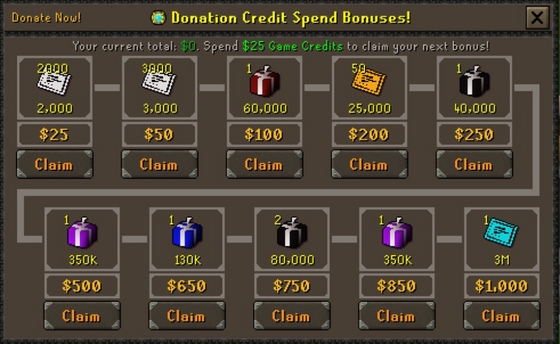
The milestones run along the path from top left to bottom right. Each one shows its reward and amount, the reward's value in PKP, the Credit Spend you need and a Claim button.
Colours: the milestone you can claim next is bright green, other milestones you've reached are dark green, and milestones you haven't reached yet are gold.
Donate Now! in the top left opens the store website.
Claiming milestones
Click Claim under a milestone. The reward goes into your inventory, and a pop-up confirms it, for example You claim a bonus of 2,000x Pk Point. When you claim the last of the 10 milestones on screen, the window moves on to your next 10.
| If you try to claim... | What happens |
|---|---|
| The next milestone, with room in your inventory | You get the reward. |
| A milestone you've reached, but an earlier one is still unclaimed | You must claim all earlier donation bonuses before this one. |
| A milestone you haven't reached yet | A pop-up shows its reward and how much more Credit Spend you need. |
| A milestone you've already claimed | You have already claimed this bonus. |
| Any milestone with a full inventory | You don't have enough inventory space to claim this bonus. |
Milestones you've reached never expire, so you can claim them whenever you're ready.
The milestones
These are the first ten milestones, as they show in the window on a new account:
| Credit Spend | Reward | |
|---|---|---|
| $25 | |
2,000 PK points |
| $50 | |
3,000 PK points |
| $100 | |
Mystery Box |
| $200 | |
50 Donator Points |
| $250 |  |
PvP Mystery Box |
| $500 | |
Extreme Mystery Box |
| $650 |  |
Super Mystery Box |
| $750 | |
2 PvP Mystery Boxes |
| $850 | |
Extreme Mystery Box |
| $1,000 | |
Custom Item Ticket ($1K) |
After that, the milestones keep going past $5,000,000. The biggest rewards come at round numbers:
| Reward | Milestones | |
|---|---|---|
|
Custom Item Ticket | Every $1,000: $1,000, $2,000, $3,000 and so on. The ticket's tier matches the milestone, up to the $250K ticket, so the $5,000 milestone gives a Custom Item Ticket ($5K). |
|
Custom Yell Tag Ticket | $1,500, then every $2,000: $3,500, $5,500, $7,500 and so on. |
|
Custom Pet Ticket | $2,500, then every $2,000: $4,500, $6,500, $8,500 and so on. |
The milestones in between give PK points, Donator Points and mystery boxes: Mystery, PvP, Super, Extreme and Legendary Mystery Boxes, with Royal and Divine Mystery Boxes at much higher totals. For what you can do with the tickets, see Custom items, Yelltags and Custom item ticket.
Credit Spend or total donated?
Credit Spend and your donations are tracked separately, and each one has its own rewards.
| Credit Spend | Deal Streak | |
|---|---|---|
| What adds to it | Spending Game Credits in the store | Donating: real money, crypto and OSRS gold, including buying Game Credits |
| Buying Game Credits | Doesn't count | Counts |
| Spending Game Credits | Counts | Doesn't count |
| Rewards | The milestones on this page: PK points, Donator Points, mystery boxes and custom item, yell tag and pet tickets | Bonus Game Credits |
| Where to check it | Quest tab › Credit Spend, or ::credit-bonus |
Quest tab › Deal Streak, or ::deal
|
So your Credit Spend only grows when you use Game Credits in the store. Bonus credits from the Deal Streak are ordinary Game Credits, so spending them adds to your Credit Spend too.
Reminders
- When you log in with milestones waiting to be claimed, a chat message says so, with a View Credit Bonus button that opens the window.
- Otherwise, a login message now and then tells you how far you are from your next milestone, and always does when you're close.
- After a store purchase that adds to your Credit Spend, the window opens by itself if you've unlocked a new milestone. Otherwise a message tells you how close your next one is.
Commands
| Command | What it does |
|---|---|
::credit-bonus, ::donate-bonus, ::credit-spend |
Opens the Donation Credit Spend Bonuses window. |
::donate |
Opens the store website. |
::deal |
Opens your Deal Streak. |
See also
| Side tabs | |
|---|---|
| Your account | |
| Getting around | |
| Knowledge Center | |
| Rewards | |
| Activities | |